

How to read the extraction overview
The Extraction overview is the project-wide rollup for the Owner and Assistants: how far extraction has come, how evenly it is spread, how fast it is moving, and how much verification is changing. The monitor answers which paper is stuck on whom; the overview answers how the whole thing is going — it’s the page to open when someone asks when extraction will be done. Reviewers don’t have it; they see their own progress instead.
The headline strip
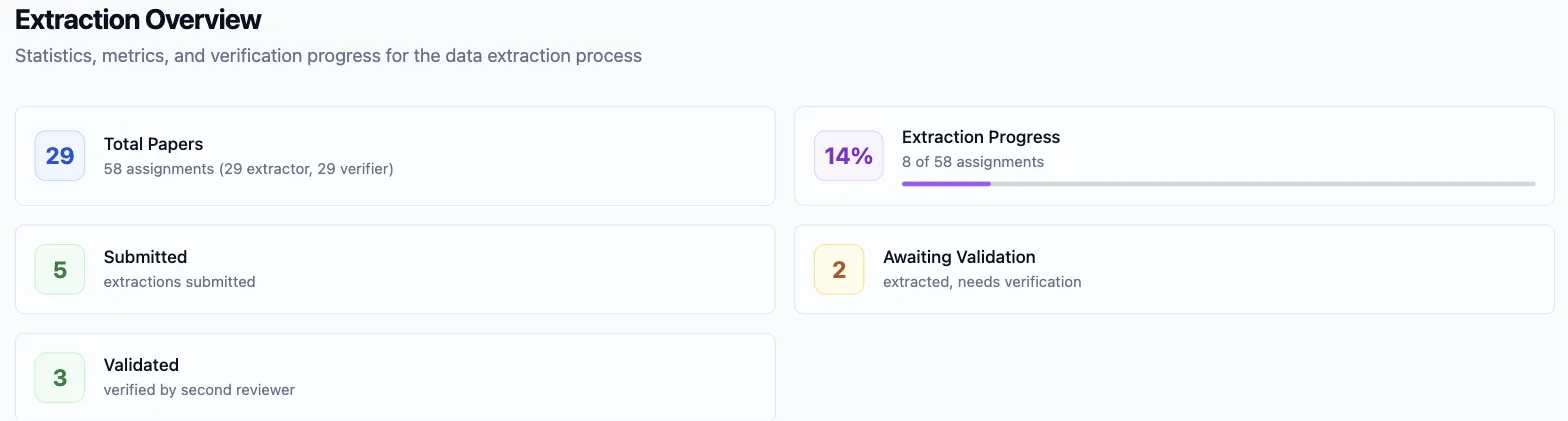
Section titled “The headline strip”Sidebar → Extraction → Extraction overview. Five tiles open the page:
- Total Papers — with the assignment count beneath it, split into extractor and verifier assignments.
- Extraction Progress — completed assignments out of all assignments, with a bar.
- Submitted — extractions that have been submitted, including those since validated.
- Awaiting Validation — papers extracted but not yet verified.
- Validated — extractions a verifier has signed off.
The tiles are counted in two units, and mixing them up is the one way to misread this page. Extraction Progress counts assignments, and on a paired project every paper carries two — so 50% can mean every paper extracted and none verified yet, not half the papers finished. Awaiting Validation counts whole papers, the same way the monitor does. When the two seem to disagree, that’s why.
Workload and pace
Section titled “Workload and pace”Two cards sit side by side under the strip.
Workload Balance scores how evenly the extraction assignments are spread across reviewers, as a Gini coefficient — 0 is a perfectly even split, 1 is everything on one person — badged Excellent, Good, Moderate, or Poor, with the reviewer count beside it. Distribution balances the load for you, so a fresh distribution scores near zero; a number that has climbed since means the roster changed after the papers were handed out.
Extraction Velocity counts assignments completed per day and per week, averaged over the days work actually happened — so a quiet week doesn’t drag the figure down — with a badge reading Increasing, Stable, or Decreasing that compares the most recent stretch of activity against the one before it. The card header keeps the ratio (N of M assignments completed). The per-week figure against the assignments still open is your finish-date estimate.

Verification quality
Section titled “Verification quality”Verification Progress is the quality-assurance ledger: Total Verifications (verifier assignments created), Verified (completed), Pending (outstanding), and Total Corrections — the fields verifiers changed, added up across every validation — with a Verification Rate bar beneath them.
Read the corrections against the verifications. A handful of corrections across many validations says extractors and verifiers are reading the template the same way; a high count says some field isn’t — worth opening a few of the corrected papers to see whether it’s one field everyone stumbles on. The evidence table always carries the verified version of a paper’s answers, so corrections are never lost, but a pattern in them is something to know before you write the review up.

On a project without verifiers the card stays and reads No verification assignments yet, and the Awaiting Validation tile above simply isn’t shown.
Where each reviewer stands
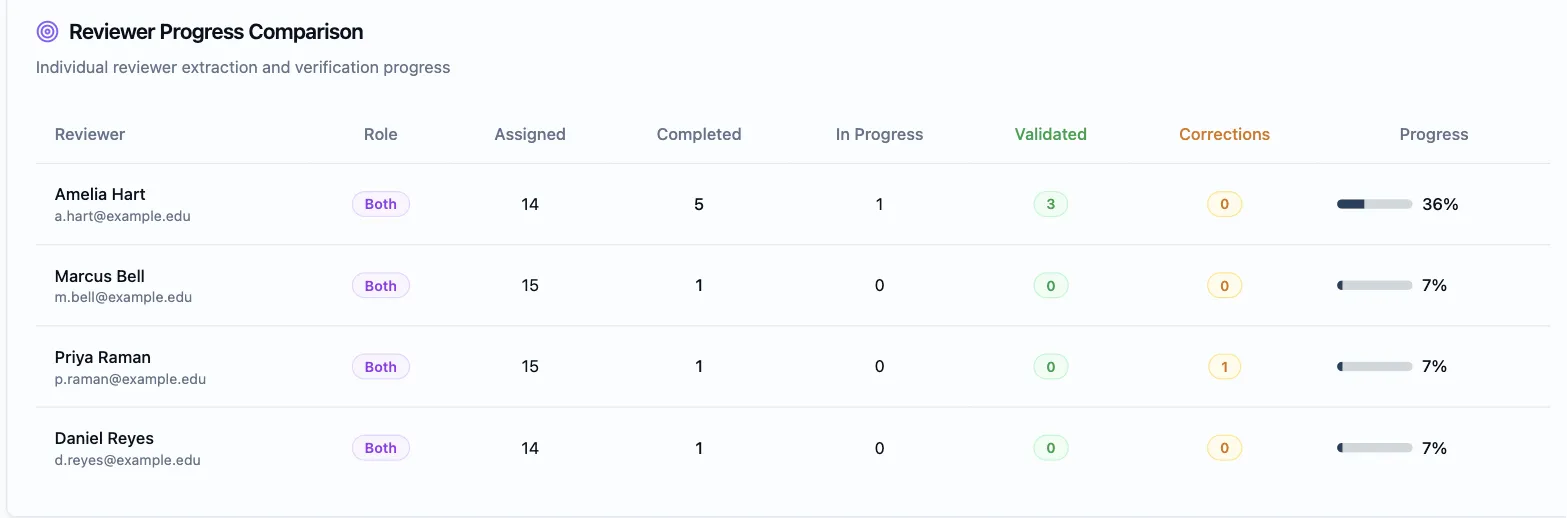
Section titled “Where each reviewer stands”Reviewer Progress Comparison is a row per person — Role (Extractor, Verifier, or Both), Assigned, Completed, In Progress, Validated (their extractions a verifier signed off), Corrections (the fields they changed as verifier), a Progress bar, and Last Activity — sorted by completion, so whoever is furthest along is on top and whoever has stalled sinks to the bottom.
Read it as two questions. Completed against Assigned is pace. Corrections is how each person verifies: someone correcting far more than everyone else is either the most careful verifier in the group or reading a field differently from the rest, and a look at two of their validations tells you which.
Assignment Status Summary closes the page with the raw assignment counts — Pending, In Progress, Completed — the same numbers the project home’s Extraction progress tile shows Owners and Assistants between visits.
When every paper is validated, extraction is done: the evidence table already holds the verified answers, and the Results synthesis can be drafted from them without anything being re-entered.