

How to read the screening overview
Screening overview is the project-wide view for the Owner and Assistants: every reviewer, every paper, one page. It reads the decisions themselves, so a call recorded a second ago is already counted; there is nothing to refresh, recompute, or export. Reviewers see their own progress instead, and the page refuses the URL if they try it directly.
The four cards
Section titled “The four cards”Sidebar → Screening → Screening overview. The page opens on four cards — Total Papers (with the total number of assignments beneath it), Screening Progress, Included Papers, and Excluded Papers.
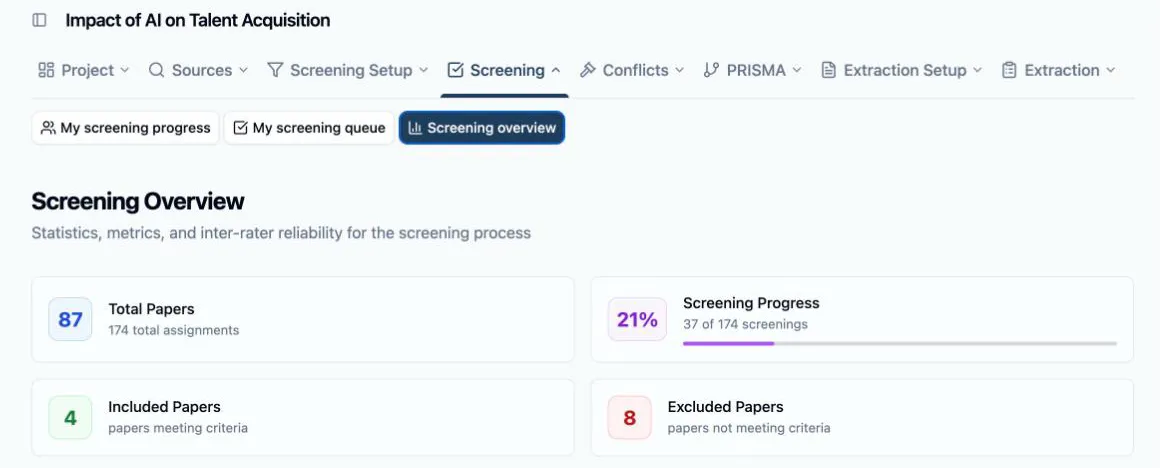
Those four cards are counted in two different units, and mixing them up is the one way to misread this page:
- Screening Progress is per review — completed screenings out of total assignments. At two reviews per paper it counts two entries for every paper, and one reviewer working through their whole queue can carry it past 50% on their own.
- Included Papers and Excluded Papers are per paper, and only count papers that have reached a final outcome: every assigned reviewer decided it and they agreed, clearing the project’s agreement threshold, or the disagreement went to conflict resolution and was resolved there.
So early in a review the percentage climbs while both paper counts sit at zero — normal, and not a sign that anything is stuck. A paper counts as Pending Review until its last assigned reviewer has decided it.
The Paper Status Summary at the foot of the page accounts for the rest. Pending Review counts papers still missing at least one decision, and Saved for Later counts the ones a reviewer parked — parked papers are pending too, so they appear in both. Active Conflicts are papers every reviewer has decided but disagreed on, waiting for an Owner or Assistant. Resolved Conflicts have already been settled and are counted in Included Papers or Excluded Papers above; the tile is there to show how many papers needed the intervention.
Where each reviewer stands
Section titled “Where each reviewer stands”Reviewer Progress Comparison is a row per reviewer — Assigned, Completed, Included, Excluded, Saved, a Progress bar, and Last Activity — sorted by completion, so whoever is furthest along is on top and whoever has stalled falls to the bottom.
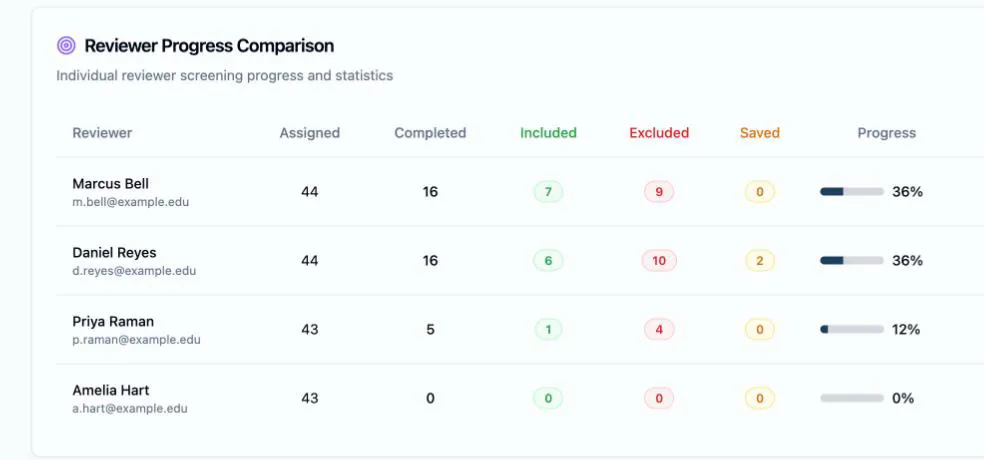
Read it as two separate questions. Completed against Assigned is pace. The Included / Excluded split is calibration: two reviewers working the same criteria on comparable stacks should be excluding at roughly comparable rates, and a reviewer including three times as much as everyone else usually means one criterion is being read differently — a criteria problem to fix in the Criteria Builder, not a reviewer problem.
Pace and workload
Section titled “Pace and workload”Two cards sit side by side above the table.
Workload Balance scores how evenly the assignments were spread, as a Gini coefficient — 0 is a perfectly even split, 1 is everything on one person — badged Excellent, Good, Moderate, or Poor. Littview’s distribution balances the load for you, so a fresh distribution scores near zero; the number climbs when reviewers were added or dropped afterwards. If it does, redistributing evens it out again without losing the decisions already made.
Screening Velocity counts papers, not reviews: how many are fully screened — all their reviewers done — per day and per week, averaged over the days screening actually happened, so a quiet fortnight doesn’t drag the average down. Its card header carries the same figure as a ratio (N of M papers fully screened), and a badge reads Increasing, Stable, or Decreasing by comparing the last seven days of activity against the seven before them. Velocity is the number to quote when someone asks when screening will be finished — the per-week figure against the papers still pending.

How much your reviewers agree
Section titled “How much your reviewers agree”Inter-Rater Reliability is four measures of whether your criteria mean the same thing to everyone screening against them. All four count only fully-reviewed papers, so they stay quiet until papers start completing.
- Average Pairwise Agreement — how often reviewer pairs landed on the same call, from 0 to 1, badged Excellent (0.8 and up), Good, Moderate, or Poor.
- Positive Agreement — of the votes cast on papers that ended up included, the share that voted to include.
- Negative Agreement — the same for papers that ended up excluded.
- Conflict Rate — the share of fully-reviewed papers that needed someone to step in, with the current split (N active, N resolved) beneath it.
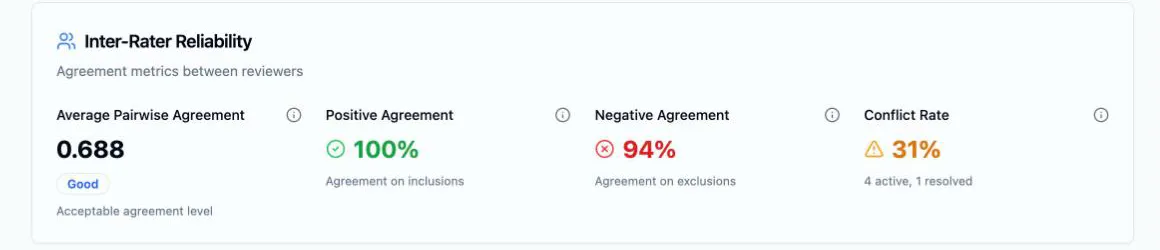
A Moderate or Poor agreement badge is a criteria signal, not a verdict on anyone’s work: something in the wording lets two careful readers reach opposite conclusions. Read a handful of the conflicts, find the category they turn on, and tighten its definition or its tags before screening the rest of the corpus. A conflict rate that keeps rising says the same thing louder.
These four measures are the ones Littview carries into the Methods section it drafts for you — reported as what they are, raw agreement proportions rather than a chance-corrected coefficient — so the tightening you do here is what the write-up ends up describing.
The headline number reaches you without opening the page: the project home dashboard opens with a Screening completion tile for Owners and Assistants, alongside open conflicts and auto-decided counts. When the overview shows every paper decided and no conflicts left open, screening is done and the same counts carry into the PRISMA pages and flow diagram without being re-entered anywhere.
Next: How conflicts are detected — what happens to the papers your reviewers disagreed on.